¶ RM Racing Electronics 8HP Performance Package
The 8HP Performance Package turns the ZF 8HP automatic into a performance gearbox driven by your RM-Primis ECU. RM-Tuner installs it into the transmission's own controller (the TCU) in a few minutes, and from then on the ECU decides when the gearbox shifts, holds the car on a transbrake, bumps it forward to stage, and gives you a clutch pedal on an automatic.
Everything is set up from RM-Tuner, on the same pages as the rest of your 8HP. Nothing is installed in the car beyond the buttons or pedal you choose to fit, and your original TCU is saved before anything is changed, so it can always be put back.
¶ 1) What it does
| Your own shift points | Upshift and downshift tables by pedal position, kickdown points, Sport offsets and braking downshifts, run by the ECU in the Performance drive mode |
| Gears and modes | The first and last gear for Drive, Sport and Manual, a Manual mode with no automatic downshifts, and an automatic upshift at the rev limit |
| Transbrake | Holds the car still while the engine builds revs and boost, released for the launch. Engaged by a button, the paddles or the gear lever |
| Bump | Creeps the car forward a little while the transbrake holds, to stage |
| Virtual clutch | A clutch pedal for the automatic, for launches and manoeuvring |
| Neutral Idle Control | Takes the drive off at a stop, so the engine does not push against the converter while you wait |
| Transmission limits | Your engine's rev limit, the highest downshift and the converter lockup in each gear, written into the transmission itself |
| Safe install | A complete copy of your TCU is saved before anything is written, and RM-Tuner can put it back at any time |
The shift points work in the Performance drive mode. The transbrake, bump, virtual clutch and Neutral Idle Control work in every drive mode.
¶ 2) What you need
| ECU | An RM-Primis ECU registered with us and registered for the Performance Package, on the latest firmware |
| Transmission | A ZF 8HP45 or 8HP70 from any make (BMW, Dodge, Jaguar and others), its TCU wired to the ECU by one CAN bus, as in the wiring diagram below |
| ECU set up for the 8HP | CAN bus set to BMW 8HP, whichever car the transmission came from, as in 8HP CAN bus and transmission |
| RM-Tuner | The latest version, from Download Software |
| For the install | A battery charger on the car, a laptop on mains power with internet, connected to the ECU by USB, and a power switch for the TCU (below) |
Any 8HP45 or 8HP70 can be flashed directly, whatever software its TCU had originally: BMW, Dodge, Jaguar or any other make. Nothing has to be converted or flashed first. RM-Tuner installs the package straight into the TCU as it comes out of the car, and the copy saved before the install puts the TCU's original software back, whichever make it came from.
¶ Wiring: one CAN bus
The Performance Package uses one CAN bus only. Wire the TCU as in this diagram:
See the 8HP wiring diagram.
The TCU has one CAN bus connected: its CAN1, wired to the ECU. Nothing else. Disconnect the gear lever (shifter) and every other module from the TCU's CAN, and leave the TCU's second CAN bus unconnected. Before it writes anything, RM-Tuner listens to the bus and stops, with nothing changed, if it hears any other device.
¶ A power switch for the TCU
Before you start, fit an easy way to switch the TCU's power off and on by itself, with the ECU staying on: a switch in the TCU's power feed, or its own fuse if it is within easy reach. It must cut every power feed of the TCU. During the install you are asked to switch the TCU off and on several times, while the ECU stays powered and connected to the laptop.
¶ 3) Update the ECU firmware
The Performance Package needs the ECU's latest firmware. Update it first, as described in Firmware Update & Recovery.
If RM-Tuner says "this ECU's firmware has no 8HP Performance settings" when you switch the mode on (section 5), or the 8HP Perf. light at the top reads OFF, the ECU's firmware is older than the package: update it and connect again.
¶ 4) Installing the Performance Package in the TCU

Connect RM-Tuner to the ECU, then open Configuration → CAN bus → Install Performance Package. The entry is there whenever the ECU is set up for the BMW 8HP.
The install takes about 10 minutes. It has five steps, and the window says each time you need to do something.
¶ Step 1 — Choose your transmission

Click 8HP45 or 8HP70, as it reads on the type plate on the transmission's case. The package is installed for the transmission you choose, so if you are not sure, check the plate or ask us before you install. The car the transmission came from does not matter: an 8HP45 from a Dodge or a Jaguar is installed exactly like one from a BMW.
¶ Step 2 — Check your transmission's limits
As soon as a transmission is chosen, Your transmission's limits fills in. These three values are written into the transmission itself as it is installed:
| Limit | What it does |
|---|---|
| Rev limit | Your engine's rev limit. The transmission shifts up by then at the latest, and the ECU's own shift points obey it too |
| Highest downshift | The highest engine speed a downshift may land at. No downshift is made that would take the engine over it |
| Converter lockup | The lowest engine speed the torque converter may lock at, in each gear |
On a first install the boxes show the Performance Package's own values for that transmission. When this ECU has installed the package before, they show the values it was last installed with, so a re-install keeps your settings.
Set Rev limit to your engine's real rev limit, and Highest downshift to the highest speed you are happy for a downshift to take the engine to. The converter lockup is installed as the package has it unless you tick Change the converter lockup and type your own value for each gear.
These limits can be changed later without installing again: see In the transmission.
¶ Step 3 — Install

Press Install. RM-Tuner first checks that it can reach our server, then shows Before you start. Check each point and press Install again.
¶ Step 4 — Saving your TCU

Before anything is written, a complete copy of your TCU is saved on this computer.
- When asked, switch the TCU off with its power switch (section 2). Keep the ECU on and the laptop connected. Press The TCU is off.
- Keep it off while the window counts 15 seconds.
- When the window says Switch the TCU on now, switch it back on.

The copy is then saved. The line over the bar counts the parts of each step, 1/2, 2/2, so you can see how far it has to go.
¶ Step 5 — Downloading and installing
The package for your transmission is downloaded from our server, and the install begins. You are asked to switch the TCU off and on once more, exactly as before.

The install counts its parts from 1/8 to 8/8. Keep everything connected and leave the laptop alone until it asks for you again.
¶ Step 6 — Switch the TCU off and on, and the check

- Switch the TCU off and wait 15 seconds.
- Switch it back on.
- Press The TCU is back on.
RM-Tuner then waits for the transmission to answer and checks that it is running the Performance Package.

Performance Package installed — close the window and go on to section 5.
Never switch anything off or unplug the laptop while the bar is moving. If an install stops part-way, your saved copy is safe: run the install again, or put your original TCU back (below). If you press Install again within 30 minutes, the copy you have just saved is used and the TCU is not saved a second time.
¶ When the package does not fit your TCU
8HP TCUs are not all the same inside. If the TCU you connect is not one the chosen package is made for, RM-Tuner says so in red while it is still saving your TCU:

It finishes saving your TCU as it is, then stops. Nothing in your TCU is changed.

Press Show the file: it opens the folder with the saved file selected. Send that file to us at [email protected] and we will look at your TCU.
¶ Putting your original TCU back
Open Install Performance Package and press Restore my original TCU.... Choose the saved copy of your TCU — the file named TCU_BACKUP in its dated folder (below). The window then asks you to switch the TCU off and on, as during the install, and checks the TCU afterwards.
With your original TCU back, untick 8HP Performance Mode on 8HP settings: the ECU stops looking for the package, and the In the transmission values read not recorded.
¶ Your saved copies
Every install saves its copy in Documents\RM-Tuner\TCU backups\Performance Package, one dated folder per session.
Each folder holds one protected file. It can only be put back into a TCU by RM-Tuner, and only we can open it. It is also the file to send us if anything goes wrong — it carries the record of what happened. Keep these folders: the first one is your TCU exactly as it came.
¶ 5) Switching it on in the ECU

Open Configuration → CAN bus → 8HP settings and tick 8HP Performance Mode.
The first time it is ticked, the ECU's Performance settings are filled with starting values made from your tune's rev limit and gear ratios, so the gearbox works sensibly straight away. The transbrake, bump and Neutral Idle Control start switched off until you set them up.
¶ The 8HP Perf. light

While the mode is on, a light at the top of RM-Tuner shows the link between the ECU and the Performance Package in the TCU:
| Light | What it means |
|---|---|
| 8HP Perf. ON (green) | The package is running in the TCU and the ECU is driving it |
| 8HP Perf. starting (amber) | The ECU is connecting to the package. Normal for a few seconds each time the TCU is switched on |
| 8HP Perf. fault (red) | The connection stopped. Point at the light to read why — see Troubleshooting |
| 8HP Perf. OFF (red) | This ECU's firmware cannot drive the package: update it |

Once the light is green, the 8HP Perform. Mode menu appears under CAN bus, with three pages: Shift points, Gears and modes and Launch & clutch.
¶ Checking what the TCU runs

On CAN bus → 8HP gearbox, press Read in the Information card. A TCU running the package shows RM Racing Electronics 8HP Performance Pack.
¶ 6) The Performance drive mode
The ECU's shift points run in the Performance drive mode. In the other modes — Eco Pro, Comfort, Sport and Sport+ — the transmission shifts with its own schedule.

8HP settings → Gearbox → Driving mode is the mode the gearbox starts in. Set it to Performance Pack to start in the Performance mode every time.
To change mode from the driver's seat with the BMW gear lever: in Park, press and hold the lever's P button. After about 5 seconds the mode steps to the next one, and it steps again every 3 seconds while you keep holding: Eco Pro, Comfort, Sport, Sport+, Performance, then back to Eco Pro. The gear display flashes as it changes. Performance is offered only once the 8HP Performance Mode is on and its shift points are set.
¶ 7) Shift points
CAN bus → 8HP Perform. Mode → Shift points
¶ Upshift points

One row for each upshift (1-2 to 7-8) and one column for each pedal position, from 0 to 100 % in steps of 10 %. Each cell is an engine RPM: the gearbox shifts up when the engine rises above the point at the pedal you are holding.
Light pedal shifts up early, for smooth and quiet driving; full pedal holds each gear to just under the rev limit. The values here are the starting points for a 7000 rpm engine.
¶ Downshift points

One row for each downshift (2-1 to 8-7) and six pedal columns (0, 20, 40, 60, 80 and 100 %). The gearbox shifts down when the engine falls below the point at the pedal you are holding.
¶ Shift points settings
Open Shift points settings under the table for the rest of the page.

| Setting | What it does |
|---|---|
| ECU shift points | Ticked: in the Performance drive mode the ECU decides the gear from the two tables. Unticked: the transmission shifts on its own schedule in every mode (the transbrake and the clutch still work) |
| Now | What the Performance functions are doing at this moment |
| Upshift at / Downshift at | The shift points in force right now, at this pedal and in this mode, Sport and braking included. — when none applies (in Park, for example) |
| Starting points | Fills both tables, the kickdown points and the Sport offsets with performance-oriented values made from your tune's rev limit and gear ratios. It asks first. Everything else — inputs, transbrake, bump, clutch and what is switched on — is kept |
| Shift check | A line under the card that checks the two tables against each other and against the transmission's limits (below) |
Shift check looks for two mistakes:
- A downshift right after an upshift. After an upshift the engine lands lower in the next gear. If it lands below that gear's downshift point, the gearbox would shift straight back, and back again.
- A downshift that would land too high. A downshift that would take the engine over the highest downshift is not made until the car has slowed enough.
When the line reads like the picture above, the tables are consistent.
The starting points and the shift check need your gearbox's eight gear ratios in Motorsport → Gear settings. For the 8HP45 and 8HP70 they are 4.714, 3.143, 2.106, 1.667, 1.285, 1.000, 0.839 and 0.667.

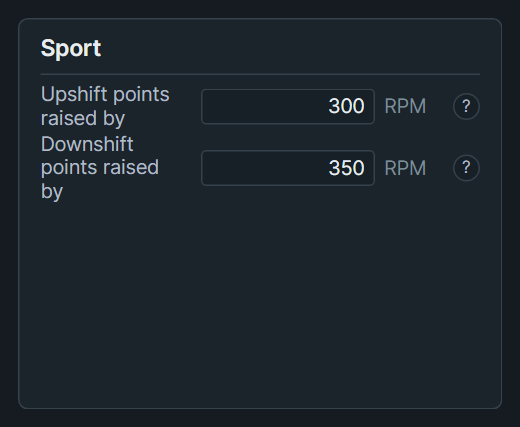
| Setting | What it does |
|---|---|
| Kickdown, From 1st … From 7th | With the pedal pushed past its kickdown point, each gear is held to this RPM. Usually a little under the rev limit |
| Sport — Upshift points raised by | In Sport, every upshift point is this much higher. A negative value lowers them |
| Sport — Downshift points raised by | In Sport, every downshift point is this much higher, so the lower gear comes earlier. A negative value lowers them |
The ECU makes one shift at a time: the next is asked for only once the transmission shows the gear.
¶ 8) Gears and modes
CAN bus → 8HP Perform. Mode → Gears and modes

Initial gear is the lowest gear in that mode: an initial gear of 2nd means the car always moves off in 2nd and never shifts below it. Last gear is the highest it shifts to.
| Mode | How you get there |
|---|---|
| Drive | The lever in D |
| Sport | The lever moved to its M/S side, with the gearbox still shifting by itself (it shows S). The Sport offsets apply. A sequential shifter has no Sport: its M is Manual |
| Manual | A tap of the lever's + or – on its M/S side (the gearbox shows M), or a paddle pulled in D or S |
¶ Manual

Each tap is one gear. A tap made while a shift is still happening follows straight after it. A downshift that would over-rev the engine waits up to 2 seconds for the car to slow down, then is dropped.
Manual ends when the lever goes back to D. If you entered it with a paddle in D, holding the upshift paddle for a second also takes you back.
| Setting | What it does |
|---|---|
| No automatic downshifts | The gearbox downshifts only when you ask, even when the engine falls to a downshift point |
| Auto-upshift | The ECU upshifts by itself 150 rpm under the rev limit. It asks a little early, from how fast the revs are rising, so the shift lands there |
¶ Braking downshifts

While you brake (the brake on and the car slowing down), the downshift points are raised by Downshift points raised by, so the right gear is ready for the corner exit. Tick In Drive and/or In Sport.
¶ Protections that are always on
Whatever the tables say, the ECU:
- shifts up 50 rpm under the rev limit in Drive and Sport;
- never makes a downshift that would land over the highest downshift, or within 300 rpm of the rev limit;
- uses the engine's own rev limit instead when that is lower (a cold engine, for example).
¶ In the transmission

What the transmission holds: its rev limit, its highest downshift and its converter lockup in each gear, as the package was installed. The ECU's shift points obey the first two as well.
Not recorded means the package was installed another way; the ECU then uses the engine's own rev limit.
To change one of these values, type the new value here. RM-Tuner asks to flash it into the transmission and opens Change your transmission's limits, with every value to check before anything is written:

Press Flash the limits. It takes about 5 minutes, needs the internet, and asks you to switch the TCU off and on once, as during the install. Everything else in your TCU, including what it has learned, is kept. Until it is flashed, the transmission and this page keep the values it already holds.
¶ 9) Launch & clutch
CAN bus → 8HP Perform. Mode → Launch & clutch
These are racing functions, for a closed course with room around the car. Letting go of the transbrake launches the car at once — and so does the transbrake's maximum duration running out.
¶ Transbrake

The transbrake locks the gearbox so the car stays still while the engine drives against the converter, building revs and boost. Let go and the car launches in the gear it is in.
It engages only with the car stopped, in 1st or 2nd, with the brake on. If the connection to the TCU is lost while it holds, the transbrake is released.
| Setting | What it does |
|---|---|
| Transbrake activation | How it is engaged: Disabled, Input, Paddles or Shifter hold (below) |
| Now | What the Performance functions are doing at this moment |
| Maximum duration | The longest the transbrake holds. When it runs out, the hold ends by itself — which launches the car. Letting go earlier still releases at once. 0: no limit |
| Launch control while holding | Ticked: while the transbrake holds, the ECU's launch control (Motorsport → Launch control / Flat shift) treats it as the clutch pressed — the launch RPM is held, and released with the launch |
| Configure the transbrake input | With Input: opens Special functions, where the button is chosen and learned (section 10) |
After a release the transbrake does not engage again until its button, paddle or lever has been let go.
The three ways to engage it:
| Activation | How it works |
|---|---|
| Input | Held while its button is pressed. Let go to launch |
| Paddles | Pull both paddles to arm it. Let one go and keep the other held: the held one holds the transbrake. Let it go to launch. While armed, the paddles shift nothing. Needing both paddles means a long pull of one paddle can never engage it by accident |
| Shifter hold | With the BMW F/G gear lever: with the gearbox in D, pull the lever fully back and hold it for the Arming time. Let it go to launch |


Arming time (Shifter hold only) is how long the lever must be held fully back before the transbrake engages. 0 means 6.0 seconds.
¶ Bump

A bump lets the transbrake go for a moment, so the car creeps forward to stage. Each press is one bump, one at a time, while the transbrake holds.
| Setting | What it does |
|---|---|
| Bump activation | Disabled, Input (its own button, set up on Special functions) or Paddles. With the transbrake on the paddles, the bump is the paddle that is not holding it; otherwise either paddle |
| Bump distance | How far one bump moves the car. Towards More the transbrake lets go further and the car moves further; towards Less it holds harder and the car hardly moves — at the far left, not at all. The far right lets go completely; the starting point is one step from it |
| Bump time | How long the transbrake lets go for one bump, in 40 ms steps up to 600 ms. Letting go and taking hold again add about 80 ms each. Longer moves the car further. Starting value 200 ms |
| Configure the bump input | With Input: opens Special functions |
How far a bump moves the car also depends on the car itself: change Bump distance and Bump time a little at a time.
¶ Virtual clutch

A clutch pedal fitted to the automatic. As you press it, the transmission's clutch is opened as a manual car's would be — for launches, and for manoeuvring slowly. In the picture the pedal is pressed about a third of the way.
| Setting | What it does |
|---|---|
| Clutch pedal | The pedal's travel now: 0 % released, 100 % fully pressed |
| Bite point | How soon the car starts moving as you release the pedal. Higher (Early): the car moves with just a small release. Lower (Late): the pedal has to come up almost all the way. Starting value 25 % |
| Creep when pressed | Whether the car stands still or creeps with the pedal fully pressed. At None it stands still; higher, it creeps even with the pedal fully down, and the drive comes back sooner as you release. Neutral Idle Control uses it too. Starting value None |
| Configure and calibrate the clutch pedal | Opens Special functions, where the pedal's input is chosen and learned |
Keep Bite point above Creep when pressed. With the pedal fully released the gearbox drives as it always does.
If the pedal's sensor reads outside its learned travel — a broken wire or a short — the ECU takes the pedal as released, and the Now line and Special functions say so.
¶ Neutral Idle Control

When you stop after driving, in 1st or 2nd, with the brake on and the throttle released, the drive is taken off as if the clutch pedal were fully pressed, so the engine is not pushing against the converter while you wait. Lift the brake (or press the throttle) and the drive comes back over the Return time (0 means 0.40 s).
Selecting D at a stop, or braking again without having moved, does not take the drive off. It works with or without a clutch pedal fitted.
¶ 10) Inputs: the transbrake and bump buttons, and the clutch pedal
Configuration → Inputs & outputs → Special functions, in the Gearbox controls (BMW 8HP) table, with the ECU's other driver inputs. The Go to inputs buttons on Launch & clutch take you straight there.

These rows appear once the 8HP Performance Mode is on and the 8HP Perf. light is green: Virtual clutch always, Transbrake and Bump when their activation is Input. The paddles are set up in the same table, as in Paddles.
| Column | What it shows |
|---|---|
| Input | The ECU input the button or pedal is wired to |
| Edge | Rising or Falling: which way the input changes when the button is pressed |
| Voltage | What the input reads now |
| Learned | The voltage learned for the button, or the pedal's two ends |
| State | ON while the button is pressed; for the pedal, its travel in % |
¶ A button on an analog input
- Choose the Input it is wired to.
- Press and hold the button.
- Press Learn. The voltage it reads is stored under Learned.
- Let go: State reads OFF. Press the button: it reads ON.
One analog input can carry several buttons, each at its own voltage — a resistor ladder, as for the paddles. In the picture the paddles share Spare temp. 1 (1.25 V and 2.50 V), and the transbrake and bump buttons share Spare temp. 2 (2.50 V and 3.75 V). Learn each button on its own.
A button on a digital input needs no learn. If State reads ON while the button is not pressed, change the Edge.
¶ The clutch pedal
- Choose the analog Input the pedal's sensor is wired to.
- With the pedal fully up, press Released.
- With the pedal pressed fully down, press Pressed.
- State now shows the pedal's travel: check it reads 0 % with the pedal up and 100 % with it fully down.
Each end has to read between 0.2 V and 4.9 V, and the two ends far enough apart; RM-Tuner refuses a learn that is not, and says why. A pedal with a simple switch can go on a digital input instead: it reads 0 % or 100 %.
¶ 11) How to tune it
Work in this order, with the car on a safe road or a closed course, and log as you go.
1. Before the first drive
- Gear ratios in Motorsport → Gear settings (section 7).
- Wheel circumference and final drive ratio in 8HP settings → Speed calibration, as in 8HP CAN bus and transmission.
- In the transmission: the rev limit should be your engine's rev limit.
- Shift points → Starting points, then read the Shift check line. The starting points are made from your engine's rev limit: if your transmission's highest downshift is lower than that, the line names the downshift cells that would land over it. Lower those cells until the line reports no problem (otherwise those downshifts are only made once the car has slowed enough).
2. Upshifts
Drive in the Performance mode and look at where each shift happens against the pedal you were holding.
- 0–30 % pedal is everyday driving. Lower points shift up earlier: smoother, quieter, more economical. Too low and the engine labours in the next gear.
- 40–70 % is brisk driving. Shift where the engine still pulls well in the next gear.
- 80–100 % is full power: just under the rev limit.
- Keep each row rising smoothly across the pedal, so that a small movement of your foot never moves the shift point by a lot.
Where an upshift lands in the next gear is the RPM × the next gear's ratio ÷ this gear's ratio. A 1-2 shift at 6800 rpm lands at 6800 × 3.143 ÷ 4.714 = 4533 rpm in 2nd.
3. Downshifts
Each downshift point must be below where the upshift into that gear lands, or the gearbox hunts between two gears. The Shift check line names any cell that would.
- Raise them for a quicker response when you press the pedal, and for more engine braking.
- Lower them for calmer driving.
4. Sport, braking and kickdown
- Sport: a few hundred rpm higher than Drive is usual (the starting values are +300 up and +350 down).
- Braking downshifts: 500–900 rpm gets the right gear ready for the corner exit without jerky downshifts.
- Kickdown: about 100 rpm under the rev limit.
5. Manual
For track use, No automatic downshifts with Auto-upshift behaves like a race gearbox: it only goes down when you ask, and goes up by itself at the limit if you miss a shift.
6. Transbrake and bump
- Set up the button (section 10), and check its State on Special functions.
- Start with Maximum duration short (a few seconds) while you learn the car.
- With Launch control while holding ticked, the launch RPM from Motorsport → Launch control / Flat shift holds the engine while you wait on the transbrake.
- Bump: from the starting values, change Bump distance first, a step at a time, then Bump time.
7. Clutch pedal
- Learn the pedal's ends (section 10).
- Move Bite point until the car starts moving where your foot expects it.
- Leave Creep when pressed at None unless you want the car to creep with the pedal down.
8. Neutral Idle Control
Switch it on. If the drive comes back too abruptly when you lift the brake, make Return time longer.
9. Converter lockup
A lower lockup speed locks the converter earlier: more direct, less slip and less heat. A higher one keeps the converter working longer at low engine speeds: smoother pulling away and more torque multiplication. Change it in In the transmission (it flashes the TCU).
¶ Starting values
What Starting points and the first tick of 8HP Performance Mode give a 7000 rpm engine:
| Upshifts | 2500 rpm at 0 % pedal, rising to 6800 rpm at 100 % |
| Kickdown | 6900 rpm from every gear |
| Downshifts | Just under where each upshift lands, never within 300 rpm of the rev limit |
| Sport | Upshifts +300 rpm, downshifts +350 rpm |
| Braking downshifts | On in Drive and Sport, +700 rpm |
| Gears | 1st to 8th in every mode |
| Transbrake | Disabled until set; maximum duration 6.0 s; arming time 6.0 s; launch control while holding on |
| Bump | Disabled until set; 200 ms |
| Clutch | Bite point 25 %, Creep when pressed None |
| Neutral Idle Control | Off until switched on; return time 0.40 s |
¶ 12) Live values and logging
The Performance pages show what is happening while you drive: the Now line, and Upshift at / Downshift at on Shift points. The same values are recorded in RM-Tuner's logs:
| Log channel | What it records |
|---|---|
| Trans Shift in progress | 1 while the gearbox is shifting |
| Perf. Link state | 4 running; 1 to 3 starting; 5 fault; 0 off |
| Perf. Gear request | The gear the ECU asks for; 0 when the transmission chooses itself |
| Perf. Upshift RPM | The upshift point in force |
| Perf. Downshift RPM | The downshift point in force |
| Perf. Status bits | What the Performance functions are doing (below) |
| Status bit | Meaning |
|---|---|
| 0 | The ECU decides the gear |
| 1 | Manual |
| 2 | A shift asked for, waiting for the transmission |
| 3 | Kickdown |
| 4 | Braking downshifts |
| 5 | Transbrake holding |
| 6 | Neutral Idle Control has taken the drive off |
| 7 | Clutch pedal pressed |
| 9 | The ECU's Performance settings are not set |
| 10 | Launch control held by the transbrake |
| 11 | Performance drive mode |
| 12 | Clutch sensor outside its learned travel |
¶ 13) Troubleshooting
¶ Install Performance Package is not in the menu
The ECU is not set up for the BMW 8HP. Set the CAN bus model to BMW 8HP first (8HP CAN bus and transmission).
¶ The install refuses to start
| Message | What to do |
|---|---|
| This ECU's firmware is older than 1.04.06 | Update the ECU's firmware (section 3) |
| This ECU is not registered yet | Your ECU's registration has not been confirmed. Once we confirm it, switch the ignition off and on and try again |
| No internet connection | The package comes from our server: connect the laptop to the internet |
| Our server did not give the package | This ECU is not registered for the Performance Package. Contact us |
¶ The install stops
| Message | What to do |
|---|---|
| Another device is transmitting on its CAN pair | Something other than the ECU is on the TCU's CAN — usually the gear lever or another module. Only the ECU may be connected there (section 2): disconnect it and start again |
| The TCU is still powered | The TCU did not go off. Switch off every TCU power feed, wait 30 seconds, and start again; switch it on only when asked |
| This computer was too busy | Close other programs, keep the laptop on mains power, and try again |
| Nothing came from the TCU | The TCU is still off: switch it on |
| The install did not finish | Your saved copy is safe. Try again, or put your original TCU back |
If an install stops and you cannot see why, press Show the file and send us that file.
¶ The 8HP Perf. light
- Stays amber — the TCU is off, or the package is not installed in it.
- Red, fault — point at the light to read the reason:
- the TCU does not answer: check the TCU's power and CAN wiring, or install the package;
- switch the TCU off and on: do exactly that;
- another version of the Performance Package: install it again;
- not the one for this ECU's firmware: update the ECU's firmware and install the package again.
- Red, OFF — update the ECU's firmware.
¶ The 8HP Perform. Mode menu is missing
Tick 8HP Performance Mode on 8HP settings, and wait for the light to turn green.
¶ The car does not use my shift points
- Driving mode must be Performance Pack, or step to Performance with the P button (section 6).
- ECU shift points must be ticked on Shift points.
- The light must be green.
¶ The gearbox shifts back and forth
A downshift point is above where the upshift into that gear lands. Read the Shift check line on Shift points and lower the cell it names.
¶ The transbrake does not engage
- The car must be stopped, in 1st or 2nd, with the brake on.
- After a release, let go of the button, paddle or lever before engaging it again.
- With Input: check the button's State on Special functions reads ON while you press it.
- With Shifter hold: the gearbox must be in D, and the lever held fully back for the whole Arming time.
¶ The clutch pedal reads FAULT
The pedal's sensor reads outside its learned travel: check its wiring, then learn Released and Pressed again. While it reads FAULT the pedal is taken as released and the gearbox drives normally.
¶ 14) Need help?
Contact customer support at [email protected]. If your question is about an install, attach the file from Show the file, or the newest folder in Documents\RM-Tuner\TCU backups\Performance Package.
Documentation and RM-Tuner downloads are at docs.rmracingelectronics.com.